-

Cùng tham gia nhóm của FuOverflow trên Facebook https://www.facebook.com/groups/nvh2fuoverflow
C
PRJ302_-_PE_-_SU_2025_-_Block_1_4009.webp
Bài viết gốc: Chủ đề 'PRJ302 - PE - SU 2025 - Block 1'
Account: user1
Password:
Your post:
POST
List of posts:
Post
Account Post date
Answer quiz for PT1
user1
2024-10-12
Answer quiz for PT2
user2
2024-05-22
Zip file and submit WS1 user3
2025-06-15
Zip file and submit WS1 user4
2024-11-24
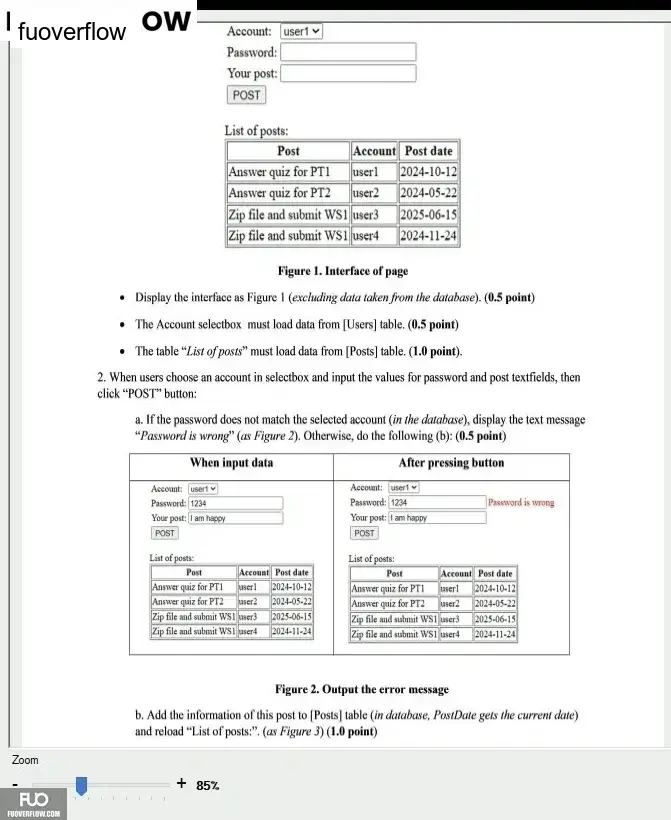
Figure 1. Interface of page
Display the interface as Figure 1 (excluding data taken from the database). (0.5 point)
The Account selectbox must load data from [Users] table. (0.5 point)
 The table "List of posts" must load data from [Posts] table. (1.0 point).
2. When users choose an account in selectbox and input the values for password and post textfields, then
click "POST" button:
a. If the password does not match the selected account (in the database), display the text message
"Password is wrong" (as Figure 2). Otherwise, do the following (b): (0.5 point)
When input data
Account: usert
Password: 1234
After pressing button
Account: user1
Password: 1234
Password is wrong
Your post: I am happy
Your post: I am happy
POST
POST
List of posts:
List of posts:
Post
Account Post date
Post
Account Post date
Answer quiz for PT1
userl
2024-10-12
Answer quiz for PTI
userl
2024-10-12
Answer quiz for PT2
Zip file and submit WSI user3
Zip file and submit WS1 user4
user2
2024-05-22
Answer quiz for PT2
user2
2024-05-22
2025-06-15
Zip file and submit WS1 user3
2025-06-15
2024-11-24
Zip file and submit WS1 user4
2024-11-24
Zoom
Figure 2. Output the error message
b. Add the information of this post to [Posts] table (in database, PostDate gets the current date)
and reload "List of posts:". (as Figure 3) (1.0 point)
+ 85%
Password:
Your post:
POST
List of posts:
Post
Account Post date
Answer quiz for PT1
user1
2024-10-12
Answer quiz for PT2
user2
2024-05-22
Zip file and submit WS1 user3
2025-06-15
Zip file and submit WS1 user4
2024-11-24
Figure 1. Interface of page
Display the interface as Figure 1 (excluding data taken from the database). (0.5 point)
The Account selectbox must load data from [Users] table. (0.5 point)
The table "List of posts" must load data from [Posts] table. (1.0 point).2. When users choose an account in selectbox and input the values for password and post textfields, then
click "POST" button:
a. If the password does not match the selected account (in the database), display the text message
"Password is wrong" (as Figure 2). Otherwise, do the following (b): (0.5 point)
When input data
Account: usert
Password: 1234
After pressing button
Account: user1
Password: 1234
Password is wrong
Your post: I am happy
Your post: I am happy
POST
POST
List of posts:
List of posts:
Post
Account Post date
Post
Account Post date
Answer quiz for PT1
userl
2024-10-12
Answer quiz for PTI
userl
2024-10-12
Answer quiz for PT2
Zip file and submit WSI user3
Zip file and submit WS1 user4
user2
2024-05-22
Answer quiz for PT2
user2
2024-05-22
2025-06-15
Zip file and submit WS1 user3
2025-06-15
2024-11-24
Zip file and submit WS1 user4
2024-11-24
Zoom
Figure 2. Output the error message
b. Add the information of this post to [Posts] table (in database, PostDate gets the current date)
and reload "List of posts:". (as Figure 3) (1.0 point)
+ 85%